How to edit your SPF record at Cloudflare
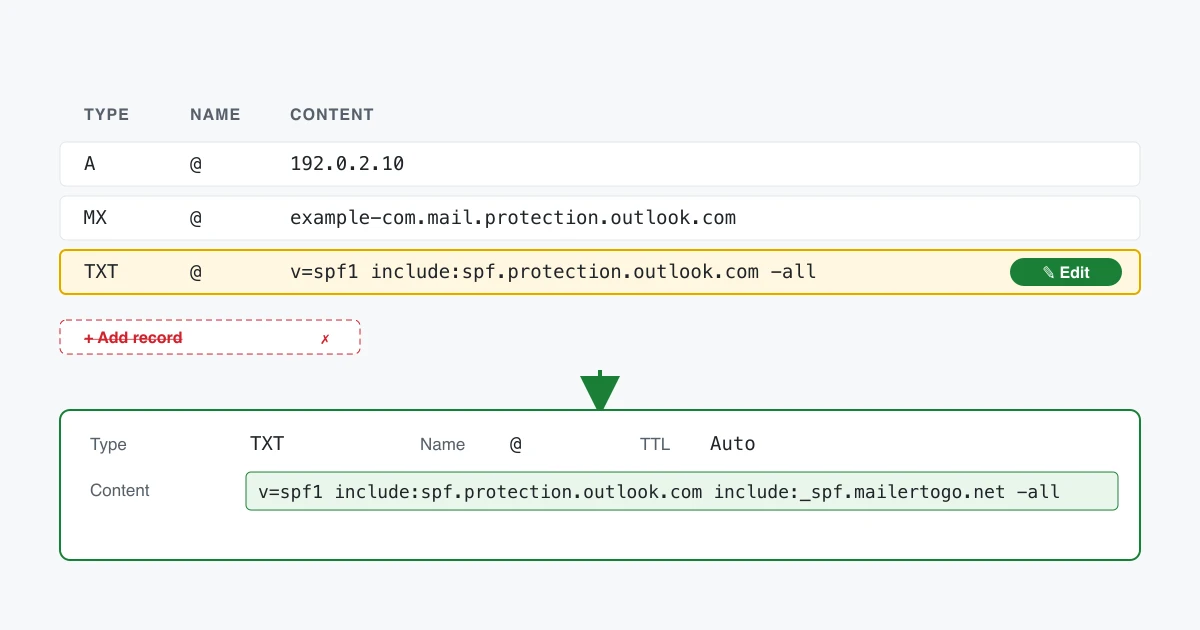
You are editing one record, not adding another. A domain may publish only one SPF record — RFC 7208 §4.5 — and a second one makes mail from your domain fail authentication at Gmail, Outlook and everywhere else. If you already have a line starting v=spf1, that is the line to change.
Find the record
- Sign in at dash.cloudflare.com and select your domain.
- Open DNS → Records in the sidebar.
- Filter or scan for Type: TXT with content beginning
v=spf1. If one exists, select Edit on that row. If none exists, select Add record and choose TXT.
Set the fields
- Type:
TXT - Name:
@— Cloudflare displays this as your domain name once saved, which is correct. - Content: your finished SPF record
- TTL: Auto
Select Save.
Proxy status does not apply here. Cloudflare's orange cloud is for HTTP records; TXT records are always served directly, so there is nothing to toggle.
Combining senders
If your existing record is:
v=spf1 include:spf.protection.outlook.com -allthe finished record is:
v=spf1 include:spf.protection.outlook.com include:_spf.mailertogo.net -allKeep your existing qualifier. If you had -all (hard fail), keep -all; if ~all (soft fail), keep that. Changing it changes how receivers treat mail from senders you have not listed, which is a separate decision from adding us.
If you send from a subdomain
If your sending domain is mail.example.com, it usually has no DNS records of its own — it inherits them from the parent domain. Make the change on the parent domain's DNS, and look for the record whose name is the subdomain.
Check it worked
Cloudflare publishes changes in seconds. Paste your domain into our SPF checker to see the live record decomposed, including how many DNS lookups it costs.
A note on the lookup limit
Cloudflare users often accumulate several include: entries. SPF allows a maximum of ten DNS lookups per evaluation (RFC 7208 §4.6.4), and each include: spends at least one — plus everything the included record spends. Go over ten and the whole record fails, for every sender in it. The SPF checker prices your record term by term and shows the running total, which is the quickest way to see whether you have room.
Why only one record
An SPF record tells receiving mail servers which servers may send as your domain. The receiver checks it during the SMTP conversation, at MAIL FROM, before it accepts the message. RFC 7208 §4.5 says a domain must publish only one, and §4.6 makes a second one a permanent error — the receiver is entitled to discard the whole evaluation. Two records is worse than one wrong one.